Graphics Driver1.1.4
Cast4TV
Jan 14, 2022
17.21 MB
1.1.4
Android 10
50,000+

Description
Unlocking Android Gaming Performance with Graphics Driver Preferences
Graphics Driver Preferences is an Android utility app that allows users to customize and manage graphics driver settings directly from their device’s Developer Options menu. If you love pushing every ounce of performance out of your smartphone – or, like me, you get way too excited tweaking system settings for fun – this tool puts powerful GPU control in your hands. Tweaking graphics drivers once felt out of reach for most people. Now, even if your tech knowledge ranks somewhere between “casual gamer” and “enthusiastic fiddler,” you’ll find Graphics Driver Preferences surprisingly friendly.
Let’s be honest. We’ve all played a mobile game and thought, “Why does this lag now? Didn’t my old phone handle this better?” The yearning for smoother graphics, fewer dropped frames, or just more consistent gameplay is universal for Android users. With Game Driver Preferences, those frustrating moments can become a thing of the past. The app was built to help everyday users improve gaming performance, enhance graphics stability, and fine-tune the GPU for specific tasks – all with a few quick taps. In this article, you’ll learn what Graphics Driver Preferences does, why it matters, and how to use it to make your Android games and apps run better.
How Graphics Driver Preferences Enhance Android 10 GPU Control
What Are Graphics Driver Preferences?
Graphics Driver Preferences give Android users direct access to select which graphics driver controls specific games or apps. Normally, the system decides these settings behind the scenes. With this app, you become the boss.
- Graphic drivers control how visual data gets processed and shown on your screen, ensuring proper GPU compatibility.
- Graphics Driver Preferences enables manual switching between drivers for better customization and performance optimization.
This feature arrived as part of Android 10’s push for greater flexibility and graphics optimization. Instead of a one-size-fits-all solution, users can now match the right driver to the right task, fine-tuning their experience for both gaming performance and stability.
Graphics Driver Preferences make it possible to:
- Change GPU drivers per app,
- Force performance or stability enhancements,
- And address compatibility issues.
For me, those days of guessing why a game won’t run or looks weird are long gone. I simply open this tool and adjust the necessary settings.
How Graphics Drivers Work on Android Devices
Your Android device ships with built-in graphics drivers controlling how your phone’s GPU works. There are two main types: system drivers for daily stability and specialized Game Drivers for high-performance tasks.
Android manages graphics instructions through APIs like Vulkan or OpenGL. These APIs translate a game’s requests into actions the GPU understands. If a game relies on Vulkan and your driver isn’t “speaking the same language,” you get lag, stuttering, or even crashes. By adjusting which driver runs for which app, you solve – or at least dodge – many common headaches like frame rate drops or abrupt graphics glitches.
The relationship is simple:
- The right graphics driver ensures optimal hardware utilization and battery life.
- Switching drivers influences stability and performance optimization.
Exploring Game Driver and System Graphics Driver Choices for Android Users
Understanding your options is half the battle. Graphics Driver Preferences exposes the two most important driver types on Android:
System Graphics Driver
The System Graphics Driver is your device’s default. This driver comes pre-installed and focuses on keeping your phone running smoothly throughout daily use.
Key attributes:
- Prioritizes graphics stability. You’re less likely to run into weird crashes or visual artifacts.
- Offers improved battery life by running more efficiently for routine tasks.
- Best for everyday apps and games that don’t push the hardware to its limits.
I often stick with this driver when I want my phone to last through a day of emails, video streaming, and basic gaming. It may not provide the highest gaming performance for cutting-edge titles, but it rarely lets me down.
Game Driver
The Game Driver is the performance champion. Introduced in Android 10, this driver optimizes your GPU for demanding 3D games or apps.
Game Driver’s best qualities:
- Prioritizes performance, increasing frame rate (FPS) for supported games.
- Leverages modern APIs like Vulkan for better graphical effects.
- Reduces stuttering, lag, and frame drops during intensive gameplay.
When I play a resource-heavy game – think shooters or open-world adventures – I switch to the Game Driver. Suddenly, gameplay becomes much smoother and visually richer.
The following table summarizes key differences:
| Attribute | System Graphics Driver | Game Driver |
| Focus | Stability, battery life | Performance, FPS |
| Usage | General apps, light games | Graphics-intensive games |
| API Optimization | Basic | Advanced (Vulkan/OpenGL) |
| Best For | Everyday use | Serious mobile gaming |
Essential Performance Optimization and Customization with Graphics Driver Preferences
Customization and Flexibility
With Graphics Driver Preferences, you can tailor your device’s performance to your exact needs. No longer are you forced to rely solely on the manufacturer’s choices.
Key points:
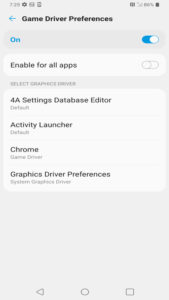
- The app gives users direct control over which driver runs each app.
- Provides flexibility to optimize for either gaming or regular use, based on your routine, and helps maintain an optimal battery life/gaming performance balance.
This degree of granularity means you can make your phone switch to the Game Driver for your favorite RPG but keep it on System Graphics Driver for reading apps or social media. If you’ve ever juggled battery life and performance, this app helps you find your personal sweet spot without complicated tinkering.
It reminds me of adjusting bike gears for the perfect ride – each tweak brings the right balance based on where you’re headed.
Performance Optimization
Want to push your phone for better gaming? Optimize battery during travel? The Graphics Driver Preferences app serves both needs.
- Game Driver boosts FPS and overall visual smoothness for improved gaming performance.
- System Graphics Driver conserves battery and keeps things steady during light use.
Many users report that enabling the Game Driver, especially for Vulkan-compatible games, brings noticeable improvements. I’ve seen lag disappear in some games and graphics glitches smooth out after a quick driver change – no advanced know-how required.
Benefits at a glance:
- Faster game loads, reduced stuttering, and higher frame rate.
- Improved battery life management when using the System Graphics Driver.
- No need for risky system modifications – simple in-app toggles do the trick for smarter graphics optimization.
Using Developer Options to Maximize Graphics Driver Preferences on Android
Enabling Developer Options
Before accessing all features of Graphics Driver Preferences, you need to unlock the Developer Options menu on your Android device:
- Open your device’s settings.
- Scroll to “About Phone,” then tap “Build Number” several times. Watch for the notification: “You’re now a developer!” (It always feels cooler than it sounds.)
- Return to Settings; find the new “Developer Options” menu.
Activating Developer Options is the gateway to real GPU control. The process is quick, taking less than a minute for most users. Some people worry it’s a “power user” feature, but honestly, it’s as easy as flicking on a light switch.
Switching and Managing Graphics Drivers
Once Developer Options are accessible, switching drivers through the Graphics Driver Preferences app is straightforward:
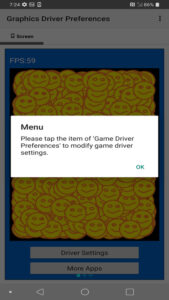
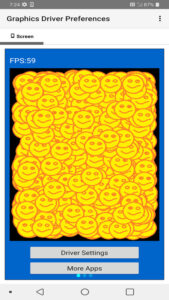
- Open the app and select “Driver Settings.”
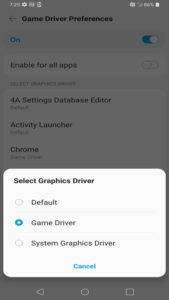
- Choose from System Graphics Driver or Game Driver in the menu.
- Select the app or game you want to optimize for better gaming performance or battery life.
- Confirm your choice – the new driver setting is now active.
This method doesn’t require root access or complex system hacks. Each app remembers your selection, so there’s no need to repeat the process after a restart. I find this feature especially handy when experimenting with new games. A quick swap, and I can judge which driver gives better results, all without risking my device.
The beauty is the flexibility. I can have one setting for streaming video, another for heavy gaming, and yet another for battery-intensive days.
Graphics Driver Preferences: Game Driver Benefits for Mobile Gamers and Tech Enthusiasts
Benefits for Mobile Gamers
Mobile gaming continues growing, and so does the demand for top-tier performance. Graphics Driver Preferences delivers several crucial wins for gamers:
- Lets serious gamers maximize frame rate and minimize lag with Game Driver.
- Tailors driver settings for individual games, squeezing every last drop of power from the GPU for unmatched gaming performance.
- Offers graphics stability for casual play by sticking with the System Graphics Driver on less demanding apps.
From my experience, there’s nothing quite like watching a formerly choppy game run smooth after a quick tweak. The instant improvement is easy to appreciate.
Utility for Advanced and Tech-Savvy Users
For those who love to explore every nook and cranny of Android, this app becomes an essential tool.
Benefits include:
- Fine-tuning system performance for both work and play, with detailed performance optimization.
- Solving GPU compatibility issues with specific apps by experimenting with different drivers.
- Monitoring improvements in battery life or FPS after making changes.
Advanced users may already be familiar with GPU tuning, but Graphics Driver Preferences brings those capabilities to everyone. No risky mods or system changes – just easy toggling inside an app. The sense of control feels empowering, and I enjoy the chance to test different setups until I find what works best for me.
Elevate Your Android Experience with Graphics Driver Mod APK Preferences for Gaming and Graphics Optimization
Graphics Driver Mod APK is a practical Android utility app that hands users the power to control graphics drivers for each game and app. By opening up the normally hidden GPU settings in Developer Options, this tool bridges the gap between everyday users and high-performance tuning.
With options to boost gaming performance, increase graphics stability, or extend battery life, there’s something here for both casual gamers and hardcore tech fans. The lack of deep system modification keeps things safe and accessible while still delivering meaningful benefits. I’ve enjoyed unexpected gains in game smoothness and battery conservation – results that speak for themselves.
If you want an edge in mobile gaming or enjoy customizing your mobile experience, Graphics Driver Preferences offers the right blend of control, graphics optimization, and simplicity. The difference can be dramatic or subtle, but the power is always in your hands. Give your Android device the push it deserves, and see just how much smoother your digital life can become. You can find this convenient performance tool on the App Store for easy installation and updates.
What's new
- Premium Unlocked
Images